# Synology HDD db
 ### Description
Add your HDD, SSD and NVMe drives to your Synology's compatible drive database.
The script works in DSM 7 and DSM 6.
#### What the script does:
* Gets the Synology NAS model and DSM version (so it knows which db files to edit).
* Gets a list of the HDDs, SSDs and NVMe drives installed in your Synology NAS.
* Gets each drive's model number and firmware version.
* Checks if each drive is already in the Synology's compatible-drive database.
* Adds any missing drives to the Synology's compatible-drive database.
**Planned updates:**
* Detect any connected expansion units and get the model(s) and edit the correct expansion unit db files.
* Or add support for users to specify their expansion unit model(s) as arguments.
* Or maybe use the shotgun approach and update all expansion unit db files.
* Add support for SAS drives? Are SAS drives listed as /dev/sata# or /dev/sas# ?
#### Running the script
You can either run the script in a shell, or add a "User defined script" task to Synology's Task Scheduler to run as root.
```YAML
sudo /path-to-script/syno_hdd_db.sh
```
### Description
Add your HDD, SSD and NVMe drives to your Synology's compatible drive database.
The script works in DSM 7 and DSM 6.
#### What the script does:
* Gets the Synology NAS model and DSM version (so it knows which db files to edit).
* Gets a list of the HDDs, SSDs and NVMe drives installed in your Synology NAS.
* Gets each drive's model number and firmware version.
* Checks if each drive is already in the Synology's compatible-drive database.
* Adds any missing drives to the Synology's compatible-drive database.
**Planned updates:**
* Detect any connected expansion units and get the model(s) and edit the correct expansion unit db files.
* Or add support for users to specify their expansion unit model(s) as arguments.
* Or maybe use the shotgun approach and update all expansion unit db files.
* Add support for SAS drives? Are SAS drives listed as /dev/sata# or /dev/sas# ?
#### Running the script
You can either run the script in a shell, or add a "User defined script" task to Synology's Task Scheduler to run as root.
```YAML
sudo /path-to-script/syno_hdd_db.sh
```
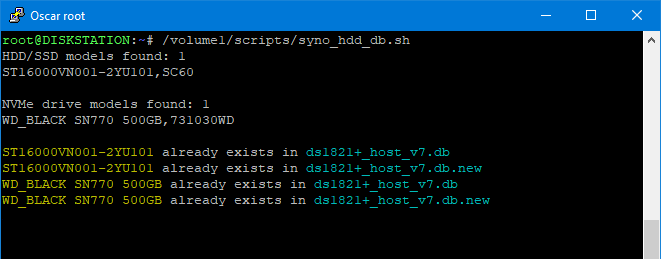
**Note:** Replace /path-to-script/ with the actual path to the script on your Synology.
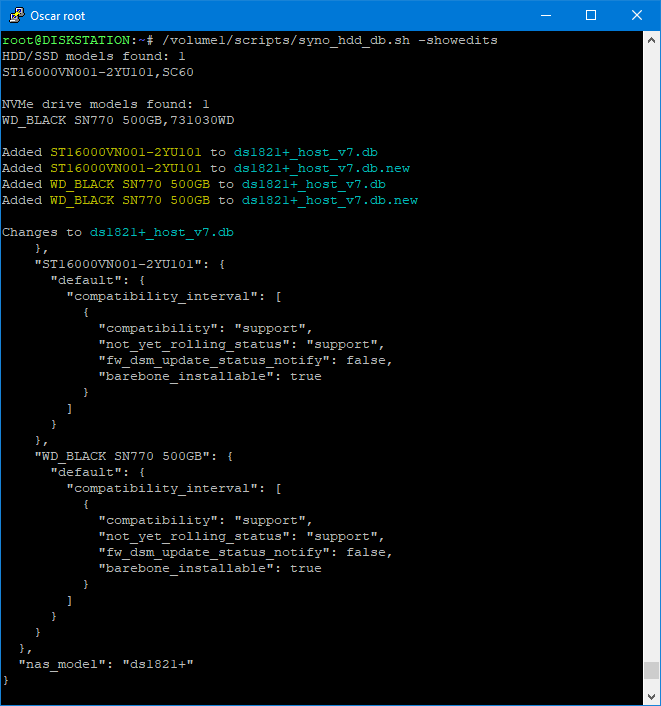
If you run the script with the -showedits flag it will show you the changes it made to the Synology's compatible-drive database. Obviously this is only useful if you run the script in a shell.
```YAML
sudo /path-to-script/syno_hdd_db.sh -showedits
```
**Note:** Replace /path-to-script/ with the actual path to the script on your Synology.
**Credits**
The idea for this script came from a comment made by Empyrealist on the Synology subreddit.